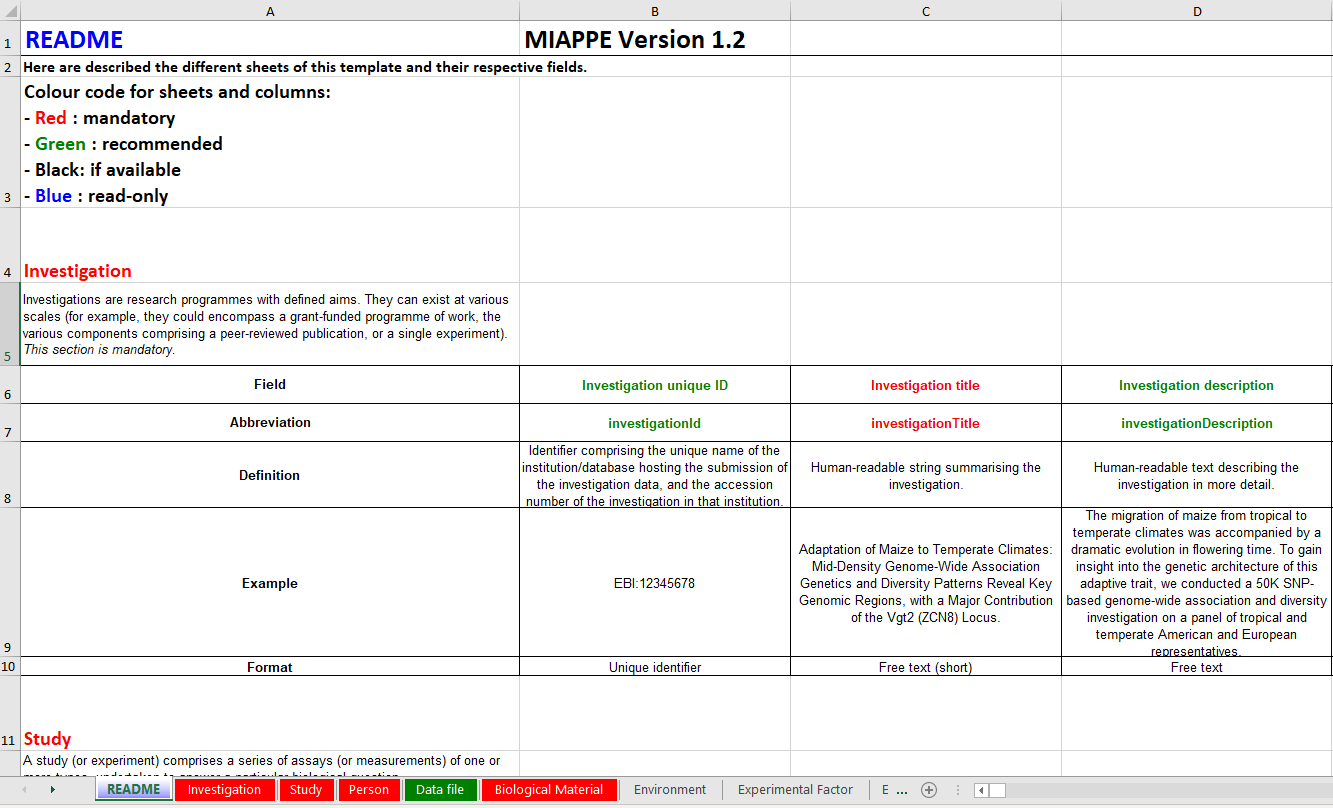
In order to be acceptable in PHENO, your MIAPPE file is required to have filled out at least all mandatory columns (fields with ‘NA’ or ‘none’ are considered filled).
Mandatory fields
* Investigation title - The title of your project/investigation (e.g., TRACE-RICE: Mediterranean rice tracing and analysis)
* MIAPPE version - Version of MIAPPE (e.g., 1.1)
Optional fields
* Investigation unique ID - A unique identifier for your project (e.g., TRACE-RICE)
* Investigation description - A description of your project/investigation
* Submission date - The date of when did you submit your data to another repository
* Public release date - The date of when did your data became public in your chosen repository
* Associated publication - The DOI/url for the publication associated with this project/investigation (if already published)
Go to the Study sheet, and fill the green row(s) (one for each study in your project/investigation)
Note
It is possible that your project is comprised of only one study.
Mandatory fields
* Study unique ID - A unique identifier for your study (e.g., TRACE-RICE;study_1)
* Study title - The title of your study (e.g., Evaluation of rice cooking parameters)
* Start date of study - Date of when the experiment started (e.g., 2002-04-04)
* Contact institution - Name and adress of the institution responsible for the study
* Geographic location (country) - Name or preferably 2-letter code of the country where the experiment took place (e.g., PT)
* Experimental site name - Name of the site, field, phenotyping facility where the experiment took place (e.g., ITQB NOVA Glasshouse - Oeiras - PT)
* Description of the experimental design - Short description of the experimental design (e.g., 2 groups (control vs treatment); “NA”; “aggregated/reduced data”, “none”)
* Observation unit description - The object of an observation, can be “NA” (e.g., observation units consisted of plots of 10 plants with a density of six plants per square meter)
* Description of growth facility - Short description of the facility in which the study was carried out (e.g, glasshouse; growth chamber; field environment condition; “NA”)
Optional fields
* Study description - A description of your experiment
* End date of study - Date and time (if relevant) of when the experiment ended (e.g., 2002-04-04T10:23:21+00:00)
* Geographic location (latitude) - Latitude of the experimental site (e.g., +43.619264)
* Geographic location (longitude) - Longitude of the experimental site (e.g., +3.967454)
* Geographic location (altitude) - Altitude of the experimental site (e.g., 50m)
* Type of experimental design - Experimental design in form of an accession number from the Crop Ontology (e.g., CO_715:0000145)
* Observation unit level hierarchy - The hierarchy of different levels of repetitions
* Type of growth facility - Short description of the facility where the experiment was carried on (e.g., field environment condition)
* Cultural practices - Type of growth condition in the form of an accession number from the Crop Ontology (e.g., CO_715:0000162)
Go to the Person sheet, and fill the green row(s) for each person working in the investigation
Mandatory fields
Person name - The name of the person (either full name or as used in scientific publications)
Person role - Type of contribution of the person to the investigation, (e.g., data submitter; author; workpackage leader)
Person affiliation - The institution the person belongs to (ITQB, Portugal)
Go to the Data file sheet, and fill the green row(s) with the links to access your data
Note
The data file links in this sheet is how users will access your data after finding it through PHENO.
Make sure these links work (DOIs are favored) and freely give access to both raw and processed phenotypic data.
Mandatory fields
Data file link - Link to the data file in a public database or in a persistent institutional repository
Data file description - Description of the format of the data file (which may be a standard file) or a description of the contents (e.g., FASTA; tab-delimited)
Data file version - The version of the dataset (e.g., 1.0)
Go to the Biological material sheet, and fill the green row(s) for each individual grown in the study/studies
Mandatory fields
Study unique ID - Semicolon-separated list of study identifiers (cross-referencing to the study sheet) in which the material was used
Biological material ID - Code used to identify the biological material in the data file (e.g., TRACE-RICE:rice1)
Organism - An identifier for the organism at the species level. NCBI taxon is recommended (e.g., NCBITAXON:4577)
Go to the Observation unit sheet, and fill the green row(s) for each individual grown in the study/studies
Mandatory fields
Study unique ID - Semicolin-separated list of study identifiers (cross-referencing to the study sheet) in which the observation unit belongs to
Biological Material ID - Biological material ID (cross-referencing to the Biological Material sheet)
Observation unit ID - Observation unit identifier (e.g., plot:894)
Observation unit type Type of observation unit (e.g., study;block;sub-block;plot;sub-plot;pot;plant)
Go to the Sample sheet, and fill the green row(s) for each sample collected from all your study biological material
Mandatory fields
Observation unit ID - Observation unit identifier (cross-referencing the Observation Unit sheet) from which this sample was exctracted
Sample ID - Sample unique identifier (e.g., rice:var1_leaf)
Plant anatomical entity - Description of the plant part using the Plant Ontology vocabulary (e.g., PO:0025161)
Collection date - Date and time the sample was collected (e.g., 2005-08-15T15:52:01+00:00)
Note
Browse the Plant Ontology to find the accession codes which best fit your sample.
Go to the Observed Variable sheet, and fill the green row(s) for each variable measured in each study
Mandatory fields
Study unique ID - Semicolin-separated list of study identifiers (cross-referencing to the study sheet) for which the variable is observed
Variable ID - Code used to identify the variable in the data file. A Crop Ontology term is recommended (e.g., Ant_Cmp_Day)
Trait - Name of the (plant or environmental) trait under observation (e.g., reproductive growth time)
Method - Named of the method used for observation (e.g., Growing degree days to anthesis)
Scale - Name of the scale associated with the variable (e.g., °C)
Done!
Once you have your MIAPPE file ready, please continue to the PHENO Submission section.
Editing a MIAPPE template can be a daunting task, but it doesn’t have to be.
With this video tutorial, you will learn how to fill a MIAPPE template in a few minutes.